The phone rings while you're serving a customer, finishing a repair or dealing with a queue at reception. Meanwhile, a list of appointment reminders and unanswered enquiries is waiting for someone to make the calls. You need coverage, but you don't want customers trapped in an automated conversation that can't help them.
An AI answering service can answer incoming calls and make planned outbound calls. The useful question isn't whether it sounds human. It's whether callers know who they're speaking with, get an accurate outcome and can reach a person when they need one.
What Callers Get When an AI Answers
An AI answering service picks up the business line, speaks in a chosen voice and either resolves the request or passes it on. Milo answers inbound calls 24/7, so callers can get help while staff are busy or the business is closed.
The business supplies the instructions. Opening hours, parking directions, services and prices should come from approved information, not the agent's best guess.
What the AI does with each call type
| Call type | What the AI does | When it hands over |
|---|---|---|
| Opening hours or directions | Answers from the knowledge base using hours, parking and service details | Only if the caller asks for a person |
| Price or service question | Answers from the script and uploaded price list | When the answer is not in the knowledge base after a message is taken |
| Appointment request | Checks the calendar, books the slot and sends a text confirmation | When the day is full or the caller wants a different staff member |
| Complaint or urgent problem | Captures name, number and reason, then passes the call on | Immediately, through a warm transfer to the owner or team member |
| Question not in the knowledge base | Says it does not know, takes a message and saves the caller as a lead | Only if the caller insists on speaking to someone now |
Give each request a defined outcome
A plumber might need to distinguish a routine estimate from an urgent leak. A salon needs service duration and staff availability. A law office needs intake boundaries that prevent a routine enquiry from turning into unsupported legal advice.
The same routing method works for each business, but the instructions differ. An honest admission that the answer isn't available is better than an invented price or promise. Milo can take a message, save the caller as a lead or transfer the call, and texts the business about each call.
Milo speaks 20 languages. Decide which languages your customers need, then test the relevant greetings, service names and handover instructions before launch.
Before launch: List your five most frequent call types. Give each one an approved answer or action, plus a clear rule for involving a person.
How a Single Call Moves From Ring to Resolution
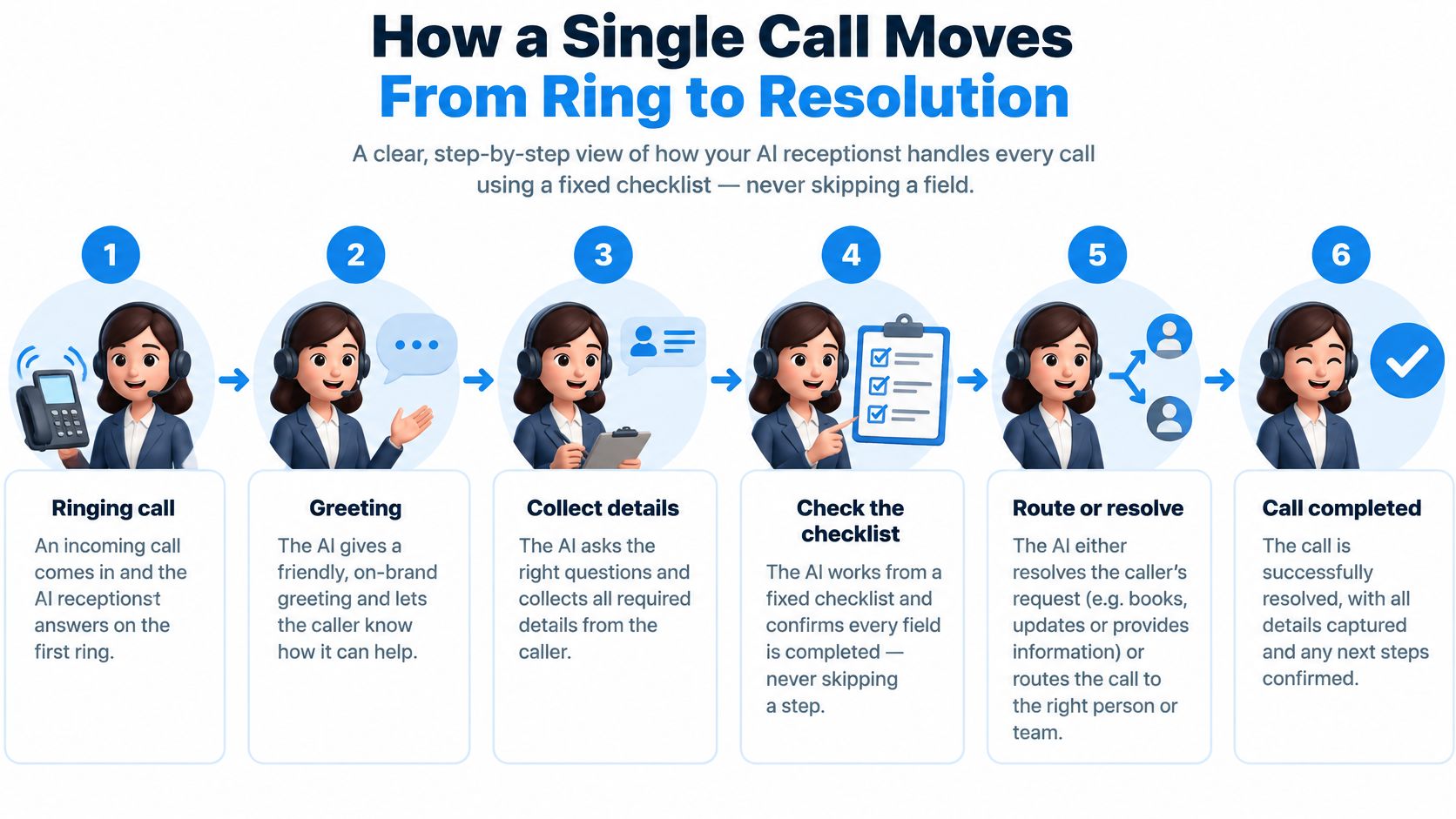
Think of the AI as a receptionist working from a checklist. Configure the required fields so it confirms what matters instead of skipping ahead when the conversation sounds complete.
Milo answers within one ring, 24/7, using the script you wrote and the voice you chose. A normal call should follow this sequence:
- Greet and identify. Include the business name and open with “I'm an AI assistant.” Early disclosure lets the caller decide how to proceed.
- Establish the reason for calling with a brief question. Someone asking to change a booking shouldn't have to explain their whole history before being routed.
- Use approved information. Pull the answer from the script and knowledge base. Missing information should produce a message or escalation, not a guess.
- Collect the necessary details and read them back. A misheard callback digit can make an otherwise useful conversation impossible to follow up.
- Complete the action. Book the appointment, send the confirmation or record the message. Tell the caller exactly what has happened.
- Transfer when needed and retain the transcript. Make the relevant context available to the receiving person so the caller doesn't start again.
The flow below shows the checkpoints from ringing to completion.
Inspect the record, not just the voice
Modern services combine established components, including telephone routing, interactive voice response, speech recognition, scheduling, messaging and searchable records, as described in Morgan Systems' history of telephone customer service. A pleasant voice is only the interface.
After a normal call, inspect the caller number, reason tag, outcome, booking details, transfer status and full transcript. Those fields let an operator distinguish a completed request from a conversation that merely ended politely.
Booking Appointments and Confirmations Without Errors
Booking is a high-risk step because spoken information becomes a commitment. A misheard name, date or number can create the wrong appointment, even when the conversation sounds smooth.
Use a strict confirmation pattern: repeat the appointment date and time, ask for explicit agreement, then write to the calendar. Keep calendar actions constrained to approved appointment types, durations and availability. The Federal Register's proceeding on AI and unwanted robocalls provides the wider consumer-protection context; operationally, businesses should treat confirmed actions, rather than conversational confidence, as the standard.
A booking that can be checked
Say a dental practice has a free Tuesday morning appointment. The caller asks for nine on Tuesday. Before saving anything, the agent should repeat the full calendar date and 9:00 a.m., then ask whether that's correct.
If the caller hesitates about which Tuesday they meant, the system should clarify rather than choose. If the requested treatment needs a different appointment length, it should offer an approved option or send the request to reception.
Google Calendar is an optional booking integration for Milo, and confirmations can go out by text. Our appointment-scheduling guide explains how to structure this workflow.
Measure completed bookings
Review field-level accuracy for names, dates and phone numbers alongside booking-success rate, transfers, abandonment and corrections. Compare the transcript with the actual calendar entry. Keep versions of your service and price documents so staff can trace an incorrect answer to the instructions used.
Finish the setup with these checks:
- Buffer time: Allow preparation, cleanup or travel between appointments.
- Booking windows: Define how soon and how far ahead callers can book.
- Confirmation recipient: Verify the mobile number and route unresolved details to staff before treating the booking as final.
Inbound Answering Compared With Outbound Calling
Inbound answering handles a call the customer starts. Outbound calling starts with a list the business uploads for reminders, lead follow-up, offers, renewals, surveys or win-backs.
Inbound callers have already chosen to reach you, so the agent's job is to answer accurately and resolve the request. An outbound recipient receives an interruption. That call has to justify itself in the first sentence: who is calling, on whose behalf, and why it matters to them. Every inbound ring is a small deposit of trust the caller has already made. Every outbound call asks for that trust up front.
Inbound answering and outbound campaigns side by side
| Factor | Inbound answering | Outbound campaigns |
|---|---|---|
| Who starts the call | The caller | The business, from an uploaded list |
| Typical use | Enquiries, bookings and after-hours message capture | Reminders, follow-ups, offers, surveys and win-backs |
| How the call opens | Greets the caller in the script and voice the business set | States the business name and the reason for calling immediately |
| Consent required | Not needed to receive the caller's own call; recording rules still apply | Prior consent generally needed for AI calls to residential or wireless numbers unless an exemption applies |
| Time of call | Whenever the caller rings | Each contact's local time within the permitted window |
| What the business gets back | Booking, message, transfer or lead | Who said yes, how each call ended, and who to call next |
Milo records how each campaign call ended, so a call can be one step in an existing CRM or retention journey. An interested customer can move to staff follow-up, while a declined offer leads to a different next action. When a campaign finishes, the full report is available as a page and as a PDF.
Use less personal information
A consumer survey reported by Twilio found 51% were uncomfortable sharing personal or financial information with AI agents, 66% felt uneasy about an agent accessing their complete business history, and 54% believed AI agents rarely or never had sufficient customer context.
State the purpose in the opening sentence. Use context the customer would expect, such as an appointment date they booked last week, rather than reciting their purchase history. The first sentence should answer the question forming in the recipient's mind: why are you calling me?
A useful win-back call explains the offer without proving how much the business knows about the recipient.
For insurance, subscriptions, research or player-reactivation lists, review sensitivity as well as commercial value. Before uploading any campaign, ask: Would this customer expect this call from this business this week?
Disclosure, Consent and Opt-Out Rules to Handle
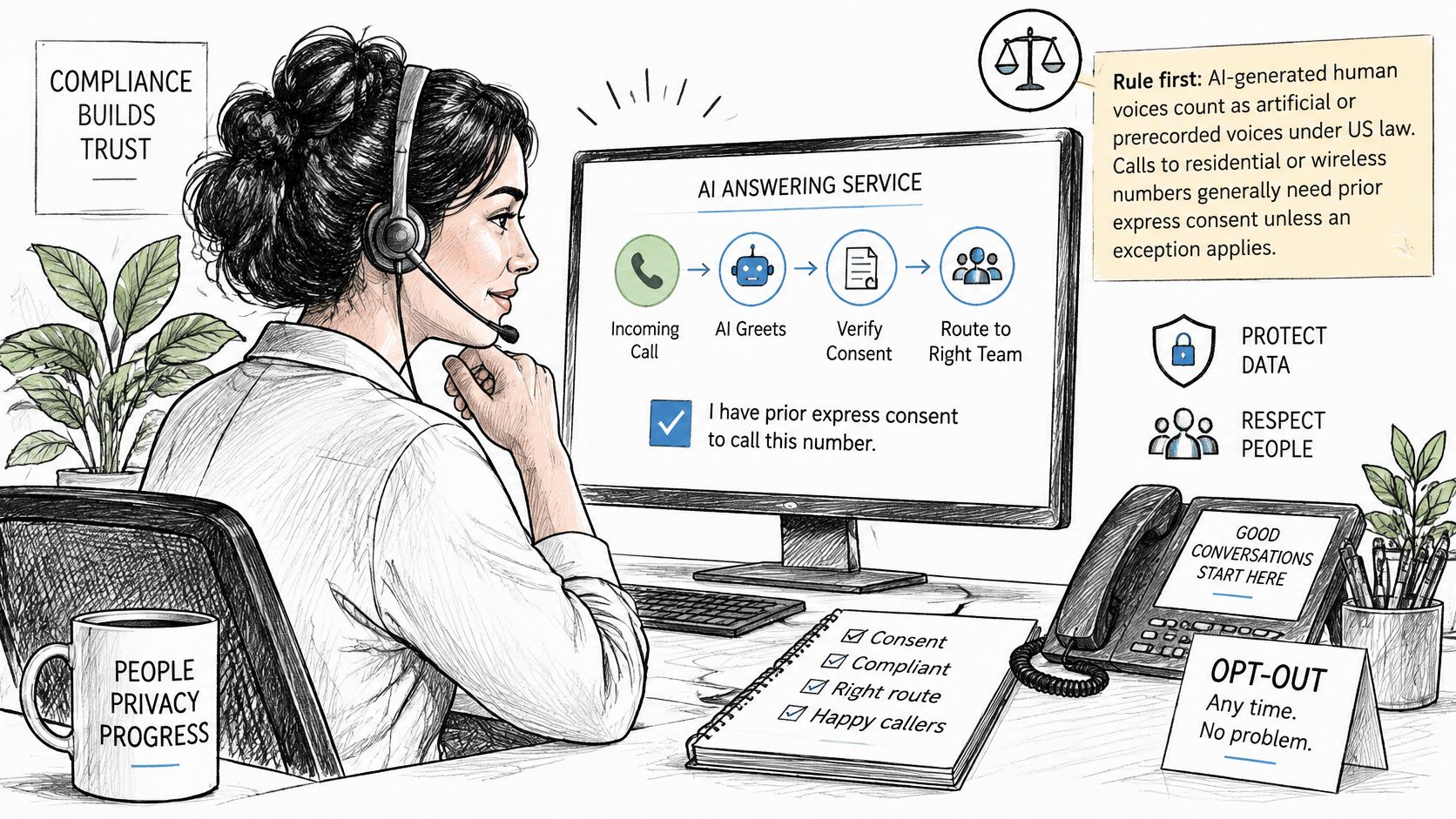
In the United States, AI-generated human voices count as “artificial or prerecorded voice” under the TCPA, and calls to residential or wireless numbers generally require prior express consent unless an exemption applies, according to the FCC's AI-voice ruling. A prior business relationship isn't blanket permission for every call type.
Build compliance into the campaign workflow before anyone is dialled.
Apply controls before dialling
- Classify the purpose. Separate transactional reminders from promotional win-backs. Promotional activity needs stricter consent and opt-out handling.
- Store the consent source, scope and timestamp against each number. Only call people who agreed to hear from your business.
- Apply suppression lists first. Remove opted-out numbers before launching, including duplicates from other uploaded lists.
- Identify the business and the AI at the beginning. Milo discloses the AI on outbound calls, but your business remains responsible for legally required AI and recording disclosures; dashboard toggles support configuration.
- Provide an automated opt-out. Recognise requests to stop calling and suppress the number across campaigns. Applicable identification and telemarketing opt-out requirements appear in the FCC's published ruling.
- Log disclosures, outcomes and opt-out events. Send uncertain consent or classification cases to human review.
The FTC's Telemarketing Sales Rule guidance limits telemarketing calls to a residence to 8:00 a.m. through 9:00 p.m. in the recipient's local time zone, unless the person has consented to other times. Check each contact's location and any stricter applicable local rules.
Plan for questions and data requests
Our AI phone-call laws guide can help you organise a compliance review. We also help businesses respond to caller data requests, including deleting a specific call recording, through hello@dialmilo.com.
Involve a lawyer before launching a new campaign type, using a purchased list or calling about health, finance or gambling. This is general information, not legal advice.
Where AI Answering Still Needs a Person
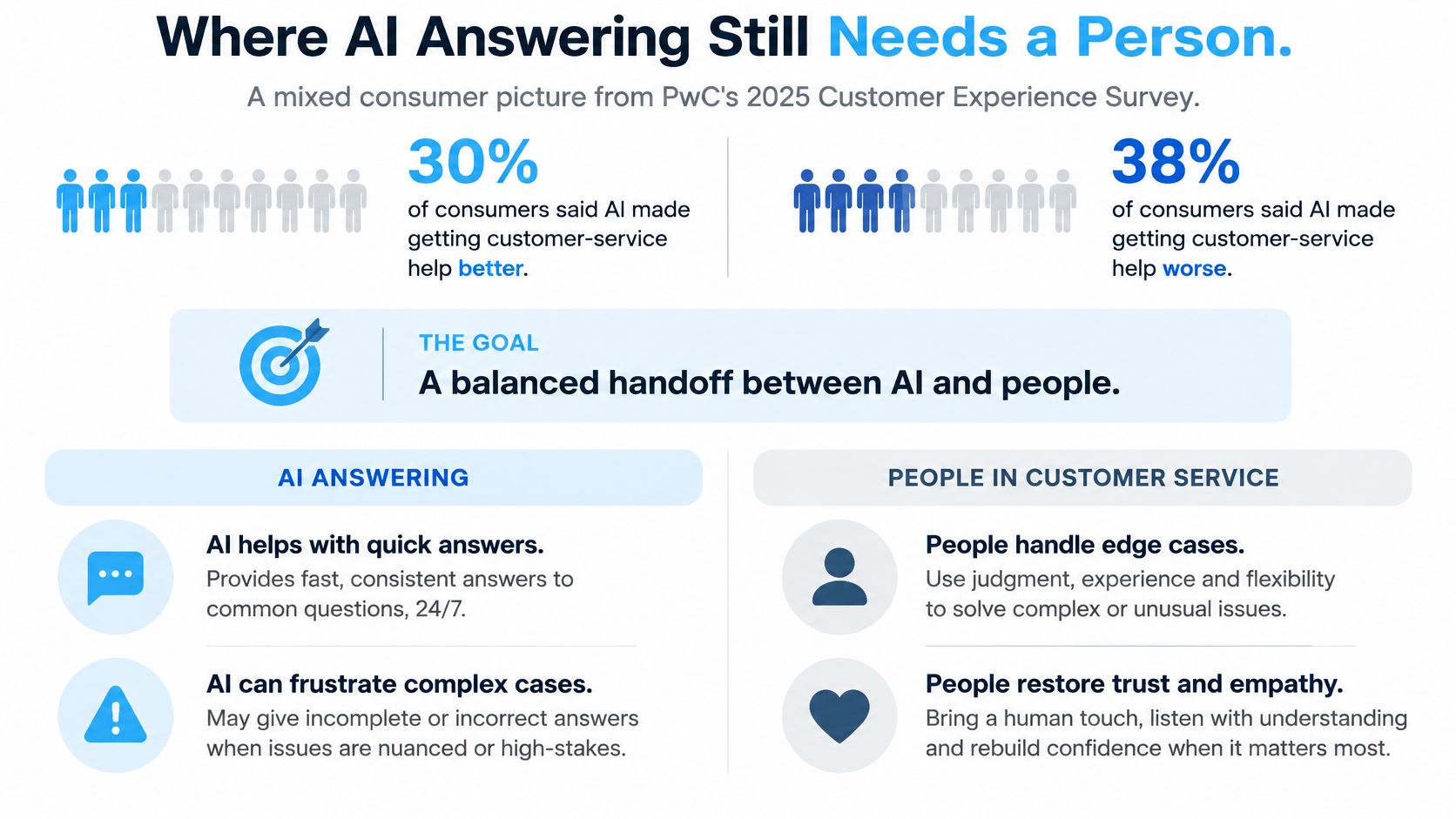
In PwC's 2025 Customer Experience Survey, 30% of consumers said AI had made obtaining customer-service assistance better, while 38% said it had made the experience worse. Maximum automation isn't a sensible target by itself.
Judge a call by the consequences of a wrong answer. Reading opening hours and resolving a disputed charge require different authority, even if both begin with a simple question.
AI-led and person-led calls
| Call type | Who leads |
|---|---|
| Appointment reminders | AI leads |
| Opening-hours questions | AI leads |
| Booking requests | AI leads |
| Reactivation of low-risk customers | AI leads |
| Complaints and disputes | Person leads |
| Cancellations involving money | Person leads |
| Health or financial details | Person leads |
| Gambling account problems | Person leads |
| Suspected fraud or a request for a human | Person leads |
Define the transfer trigger
Set an explicit escalation rule when a caller requests a person, sounds distressed or the agent misses the same point twice. Don't make a caller demonstrate frustration before allowing a handover.
For sensitive conversations, authenticate the caller before discussing account information. If someone suspects fraud, offer a route through the business's published callback number rather than asking them to trust the voice.
Handover standard: Pass the reason, confirmed details and relevant transcript to the receiving person. Don't make the customer reconstruct the conversation.
Assign a backup when the intended recipient is unavailable. The fallback might be a callback task with an owner, rather than another attempt to keep the caller talking. Staff should know which promises they're inheriting and which actions remain unfinished.
What an AI Answering Service Costs to Run
Dial Milo bills like a phone card, not a phone plan. You top up a prepaid balance and pay for what you use, with no subscription tiers and no per-seat fee. Every account includes the same features, including unlimited concurrent calls and the dashboard's disclosure and recording controls, so the only real cost questions are minutes, messages and numbers.
| Item | How it is billed | Notes |
|---|---|---|
| Talk time on a US number | Per-minute usage | AI processing and telephone costs are itemized separately, with each call's charge visible in the dashboard |
| US local number | Monthly rental | US numbers are available immediately; international numbers require business documentation and carrier compliance checks |
| Forwarding an existing number | Uses your current line | Keeps the business's own number; your existing carrier's charges remain separate |
| Text message | Charged per message sent | Used for confirmations and follow-ups |
| Outbound call nobody answers | No charge | Unanswered outbound calls are not billed |
| Subscription, minimum or contract | None | Prepaid, pay-as-you-go with no per-seat fee |
| Hearing the receptionist | Free | A 60-second browser demo plays the voice before you go live |
| Unused balance | Does not expire | Prepaid credit carries forward until used |
The current per-minute rates and number rental figures appear on the Dial Milo pricing page, and the dashboard shows what each individual call cost once the service is running.
Work through your expected volume
Estimate a month call by call. Add up the talk-time minutes your receptionist will spend on the phone, multiply by the listed per-minute rate, then add the monthly number rental and the messages you expect to send. A clinic fielding short booking calls all day lands in a very different place than a trades business taking a handful of longer enquiry calls, even at the same rate.
Unanswered outbound calls add nothing to the bill, so a reminder campaign's cost tracks only the contacts who pick up.
Compare the complete bill
Compare any answering option on the total at your expected volume, not the advertised starting rate. Our free answering service cost calculator compares an in-house receptionist, a live answering service and an AI receptionist per month, per year and per call.
Include the work left for staff, too. A low telephone bill doesn't help if someone must repair bookings or chase incomplete messages. Review usable outcomes alongside usage charges.
Because prepaid balances do not expire, you can top up conservatively and add more once call patterns become clear. For outbound campaigns, inspect early results in the dashboard before releasing more of the list.
Test Your AI Receptionist Before You Go Live
Run the service the way a caller would. Start with the free 60-second browser demo to hear the receptionist, then call your own configured number and judge the full path from greeting to record.
Use the setup sequence below to turn website information into a call workflow.
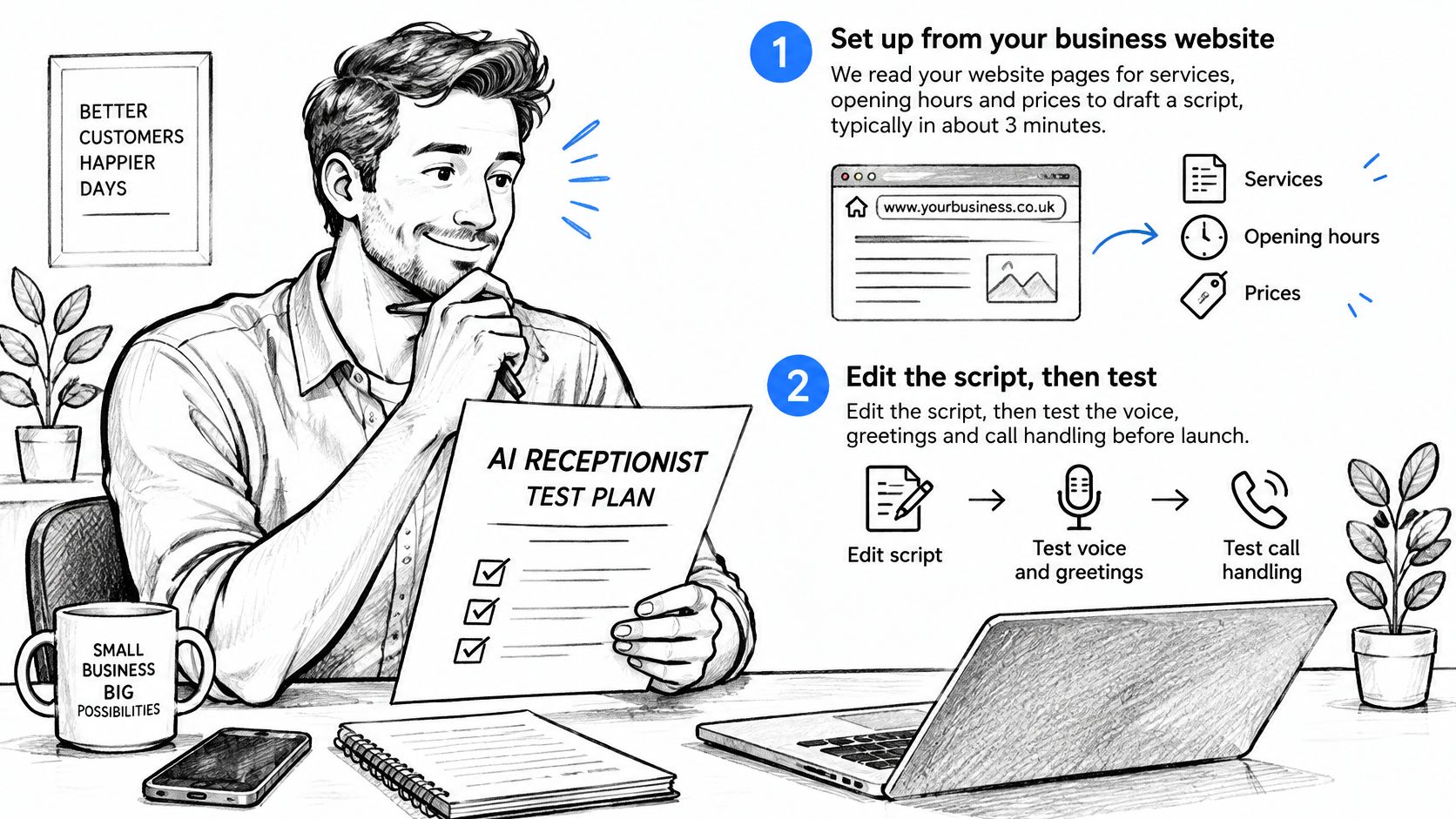
- Draft from your website. Milo reads business pages for services, opening hours and prices to draft a receptionist script. Treat that draft as a starting point and review every line before calls reach it.
- Set the caller experience. Edit the greeting, voice, tone, business hours and after-hours behaviour so a closed office does not imply staff will pick up.
- Add approved knowledge and escalation instructions. Include FAQs, current prices, parking directions if customers ask for them, and clear transfer conditions. Remove outdated or contradictory material.
- Connect the number. Take a new local or toll-free number, or forward your existing business line. Confirm calls reach Milo before customers use it.
- Make realistic test calls. Call your Milo number, ask the questions customers ask, interrupt an answer, request an unavailable appointment and ask for a person. The call should be picked up within one or two rings, open with the AI disclosure, and never sit on hold.
- Troubleshoot deliberately. If calls are not picked up, check number activation, call forwarding, business hours and the prepaid balance. Change one setting at a time, then call again.
Check the whole outcome
Judge each test by the record it leaves. The transcript should show the greeting and disclosure, the answer should come from your script or knowledge base, and an unknown question should become a message, a saved lead or a transfer. If a booking was requested, confirm the calendar entry, confirmation SMS and the text to the business match what the caller was promised. For outbound work, test an opt-out and confirm the result is recorded so the contact is not queued again.
Watch the walkthrough before making your final configuration checks.
Start with a single call type, such as after-hours booking. Open an account, run that one path end to end, and expand only after the calls produce the outcomes you intended.
Dial Milo handles inbound reception and outbound customer campaigns, with bookings, text confirmations and human transfers in the same service. Visit Dial Milo to hear how the receptionist works, then test a clearly defined call workflow before putting it in front of customers.
Keep reading
AI Voice Agents Explained: How They Work for Business
AI voice agents answer calls, book appointments and place outbound calls. Learn how they work, where businesses use them and the rules to follow.
Read
AI Appointment Setter for Inbound and Outbound
See what an AI appointment setter does on inbound and outbound calls, how booking works, and what to check before you trust it.
Read
No One Answer the Phone? How to Catch Every Call
When no one answer the phone, every missed call can become a lost enquiry. Learn how to capture callers, call back fast and stay compliant.
Read