Your phone rings while you're finishing a repair, checking in a patient, or closing the shop. You can't answer. Later, you find a voicemail asking for an appointment, but you still need to call back, ask questions, check availability, and confirm the time.
An AI appointment setter can handle that phone work. But a full calendar isn't proof that it works. The useful test is whether the right people attend, outbound contacts agreed to hear from you, and your team can inspect what happened on every call.
What an AI Appointment Setter Handles
Think of a front-desk person who stays on the phone, checks a real calendar, and writes down the agreed appointment. That's the job a phone-based AI appointment setter should complete. It isn't just a web form that collects a callback number or a chat window that promises someone will respond.
Say a salon customer calls after closing. The setter asks which service they need, checks an appropriate opening, saves the appointment, and sends a confirmation. If the customer instead wants to dispute a previous treatment, it takes a message or transfers the conversation rather than improvising an answer.
Inbound reception and outbound campaigns
Inbound means answering your business line when someone calls. The work includes identifying the caller, understanding the request, checking whether the service fits, and either booking or routing the call.
Outbound means calling your own customers, leads, or players who already agreed to hear from your business. The purpose might be a reminder, lead follow-up, reactivation, win-back, renewal, or feedback request. Not every successful outbound call ends in an appointment. A clear refusal, completed survey, or recorded opt-out is also a valid outcome.
Jobs an AI appointment setter finishes on the call
| Direction and job | Finished on the call | Hand to a person when |
|---|---|---|
| Inbound answering | Qualify the caller, book a live slot, text a confirmation or take a message | Emergency, complaint, or a request for a person |
| Outbound reminder | Confirm, reschedule, or record that they cannot attend | A dispute or a sensitive health or legal issue |
| Lead follow-up | Answer routine questions and book the next step | The lead asks for a person or the offer does not fit |
| Win-back or renewal | Offer a return visit or renewal and log yes or no | A pricing exception or a contract discussion |
| Survey or feedback | Ask a short question set and store the answers | The reply is a complaint that needs a manager |
Set boundaries before writing a script
A law office can automate consultation scheduling without letting the setter give legal advice. An insurer can arrange a renewal discussion without authorizing it to interpret coverage. A hotel can answer published check-in questions while reserving unusual accommodation requests for staff.
Write those boundaries as explicit decisions. Name which services can be booked, what information is required, and who receives exceptions.
Practical rule: A pleasant conversation isn't a completed booking. The appointment must exist in the calendar, and the caller must know what happens next.
The setter's job is to complete an authorized transaction, not keep someone talking. That distinction matters equally to a small repair shop and an operator working through a large permission-based contact list.
How a Booking Call Actually Proceeds
A booking call is a short transaction, not an open-ended conversation. Give the setter a clear sequence and rules for what to do when information is missing.
The visual summarizes the call path. Qualification belongs before a slot is offered.
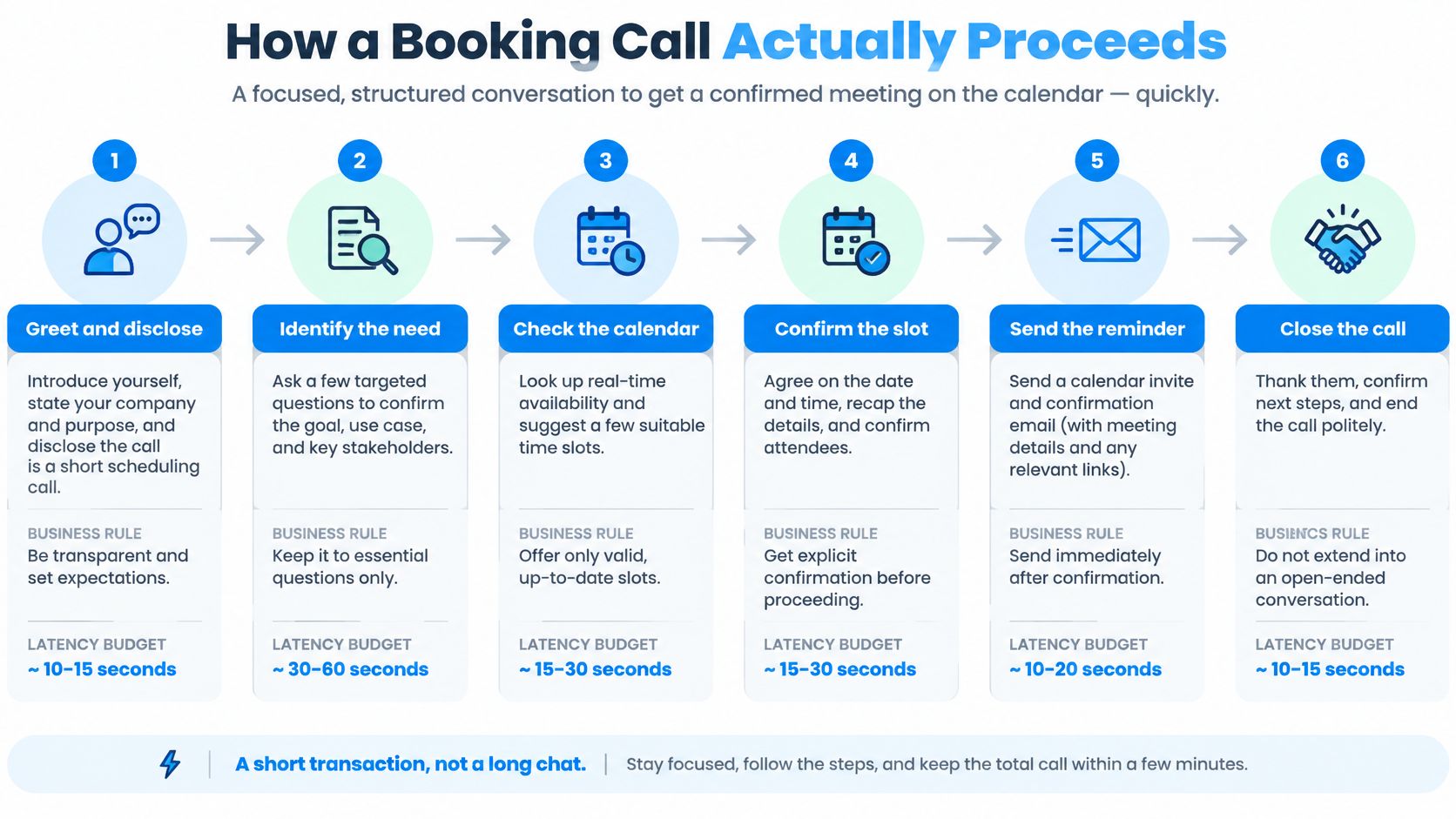
Follow a transaction sequence
- Greet and disclose. Name the business. At the start of an outbound call, identify the caller as an AI speaking for that business. Don't let the recipient mistake an automated campaign for a personal call from an employee.
- Identify the need. Separate a new booking from a reschedule, routine question, cancellation, or opt-out. A customer saying they can't come shouldn't be pushed through a new-sales script.
- Qualify before offering availability. A trade needs the job type, address, urgency, and whether the situation is an emergency or scheduled work. A clinic or salon needs the service and preferred window. A property showing needs the specific listing and buyer timeline. An auto shop needs year, make, model, issue, and drivability. A restaurant needs party size, date, and time.
- Check live availability and confirm the choice. Offer a small selection of real openings. Apply service duration, staff availability, travel buffers, and location rules. Repeat an ambiguous date using the weekday, calendar date, time, and timezone before committing.
- Write once and send the record. Save the appointment, invite the caller as a guest, and text the confirmation during the call. Don't announce success until the calendar operation succeeds.
- Close or escalate. If the service, slot, or request doesn't fit, transfer or take a message. Tell the caller what staff will receive and what remains unresolved.
For a complementary explanation of the phone-to-calendar workflow, Hyperleap AI's AI receptionist appointment booking explained provides useful context. Our Google Calendar setup guide covers connecting the booking calendar.
Prevent silence and duplicate writes
A Velaro study cited in Reynolds and Reynolds' scheduling analysis found that nearly 60% of callers wouldn't remain on hold for more than one minute. Treat that as a reason to reduce waiting, not a universal benchmark for your customers.
Set a latency budget for speech recognition, intent detection, calendar lookup, and the reply. Measure awkward pauses during test calls.
Make booking idempotent, meaning a repeated request can't create another appointment. Log call ID, caller identity, service, timezone, selected slot, booking status, and failure reason. Use a unique booking-operation identifier and check existing status before retrying a failed write.
The immediate operational test is simple: appointments the setter reports as booked must exist on the correct calendar.
Rules for Outbound AI Calls
Only call people who agreed to hear from your business. Answering your own ringing line isn't the same activity as placing automated outbound calls. An existing customer record, an old purchase, or possession of a phone number shouldn't be treated as proof of permission for every campaign.
In the United States, the FCC's February 2024 ruling confirmed that AI-generated human voices fall within the TCPA's artificial or prerecorded voice provisions, so prior express consent is generally required unless an emergency-purpose or other applicable exemption applies. The same ruling explains business-identification and opt-out requirements for covered telemarketing calls.
The checklist starts with permission because a technically successful call can still be an unauthorized one.
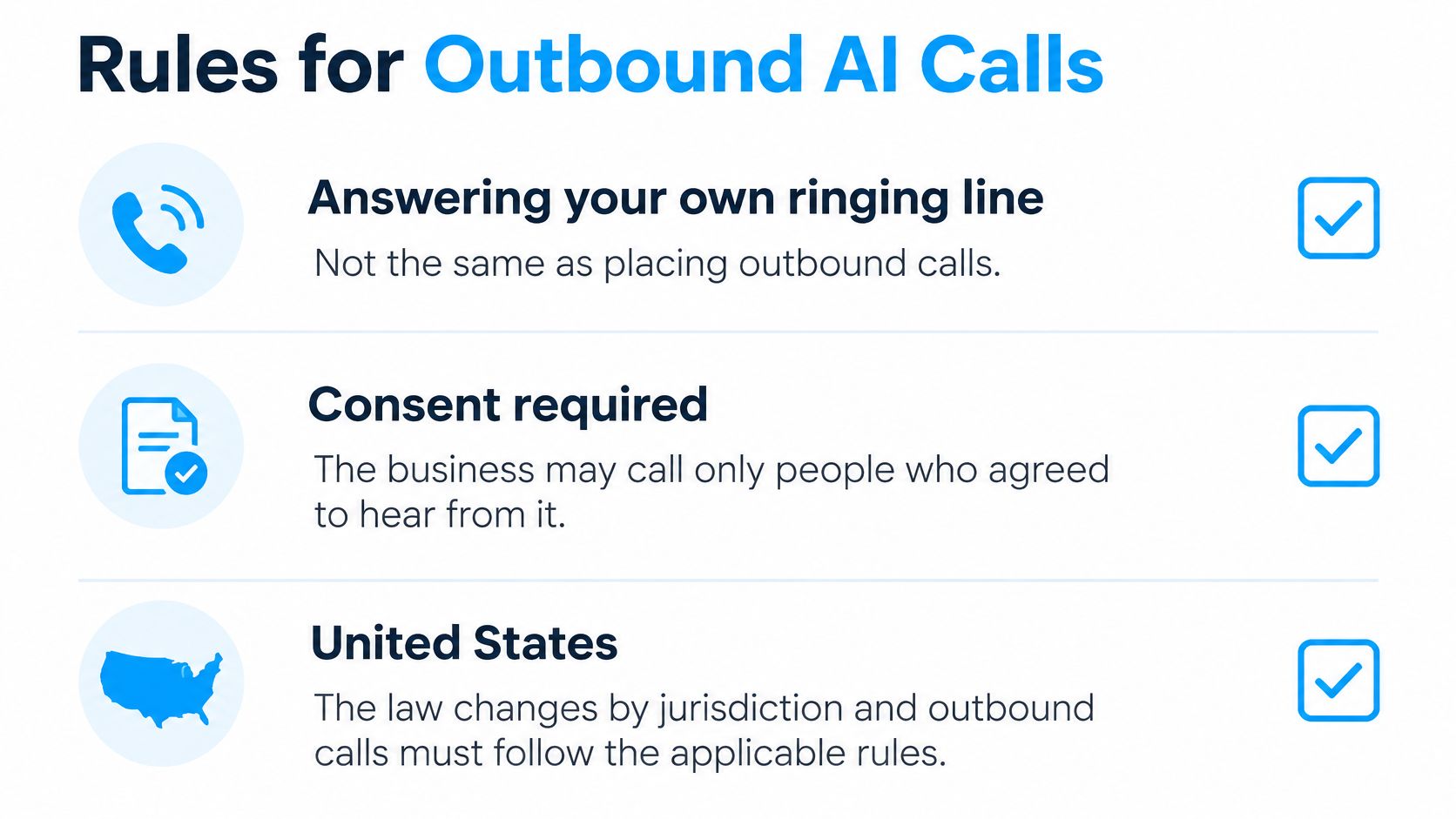
Apply consent, clock, and suppression rules
- Store consent evidence. Keep the source, wording, date, business named, and permitted communication purpose. Have qualified counsel check whether the permission covers the proposed campaign and call type.
- Schedule by recipient location. The FTC's Telemarketing Sales Rule guidance says covered calls to residences generally can't occur before 8:00 a.m. or after 9:00 p.m. in the recipient's local time, and describes National Do Not Call restrictions, exceptions such as an established business relationship or qualifying written permission, and company-specific do-not-call obligations.
- Suppress immediately. Record an opt-out at contact level and stop further campaign attempts. An exception to one restriction doesn't erase other consent duties or a person's request to stop.
- Identify the automation. Disclose the AI and responsible business at the beginning. State the purpose without hiding it behind a vague customer-service greeting.
A national dialing window won't handle contacts across timezones. Neither will a spreadsheet note that the campaign system never checks.
Design for disputed and sensitive calls
Define what happens when the setter reaches the wrong person, reads an outdated knowledge-base answer, or finds the wrong calendar. A caller who asks for a human should get a handoff route, not another attempt to finish the script.
Keep recordings and transcripts only under an approved retention and access policy. Address recording notices and jurisdiction-specific requirements before launch. Our AI phone call laws guide provides an operational starting point, not a substitute for legal review.
Transparency means telling people what the agent can do, what it can't decide, and how to reach a person.
Reminders That Protect the Calendar
A booking without follow-up can still become an empty chair or unused service bay. In an academic outpatient randomized trial summarized by SimplePractice's appointment-setting guidance, no-show rates were 23% without a reminder, 17% with an automated reminder, and 14% after a live staff call, an automated reduction of 6 percentage points, approximately 26% relative to baseline.
That distinction matters: percentage points describe the change between rates, while the relative reduction compares that change with the starting rate. Neither measure guarantees the same result in your business.
Read the evidence with its setting attached
The clinical trial and review figures below come from the linked SimplePractice summary. The probation and parole result comes from a separate six-month randomized reminder experiment, which found 29% fewer no-shows and 21% fewer cancellations after a text sent one day before the appointment.
What reminder studies found on missed appointments
| Comparison | Result | Source shape |
|---|---|---|
| No reminder in an academic outpatient trial | 23% no-show | Three-arm randomized trial |
| Automated reminder in the same trial | 17% no-show, 6 percentage points and approximately 26% relatively lower | Same trial |
| Live staff telephone reminder in the same trial | 14% no-show | Same trial |
| Hospital automated reminder programs | Nearly 29% weighted average reduction in non-attendance | Systematic review |
| Live telephone reminders in hospitals | About 39% reduction in non-attendance | Same review |
| Late text one day before the appointment, probation and parole | 29% fewer no-shows, 21% fewer cancellations | Six-month randomized experiment |
| Reminder trials overall | 19 of 20 trials positive; missed appointments down about 41% on average | Review of 20 randomized trials |
Use the table's figures when interpreting the visual. Its “23 to 7” wording isn't the outpatient trial result.
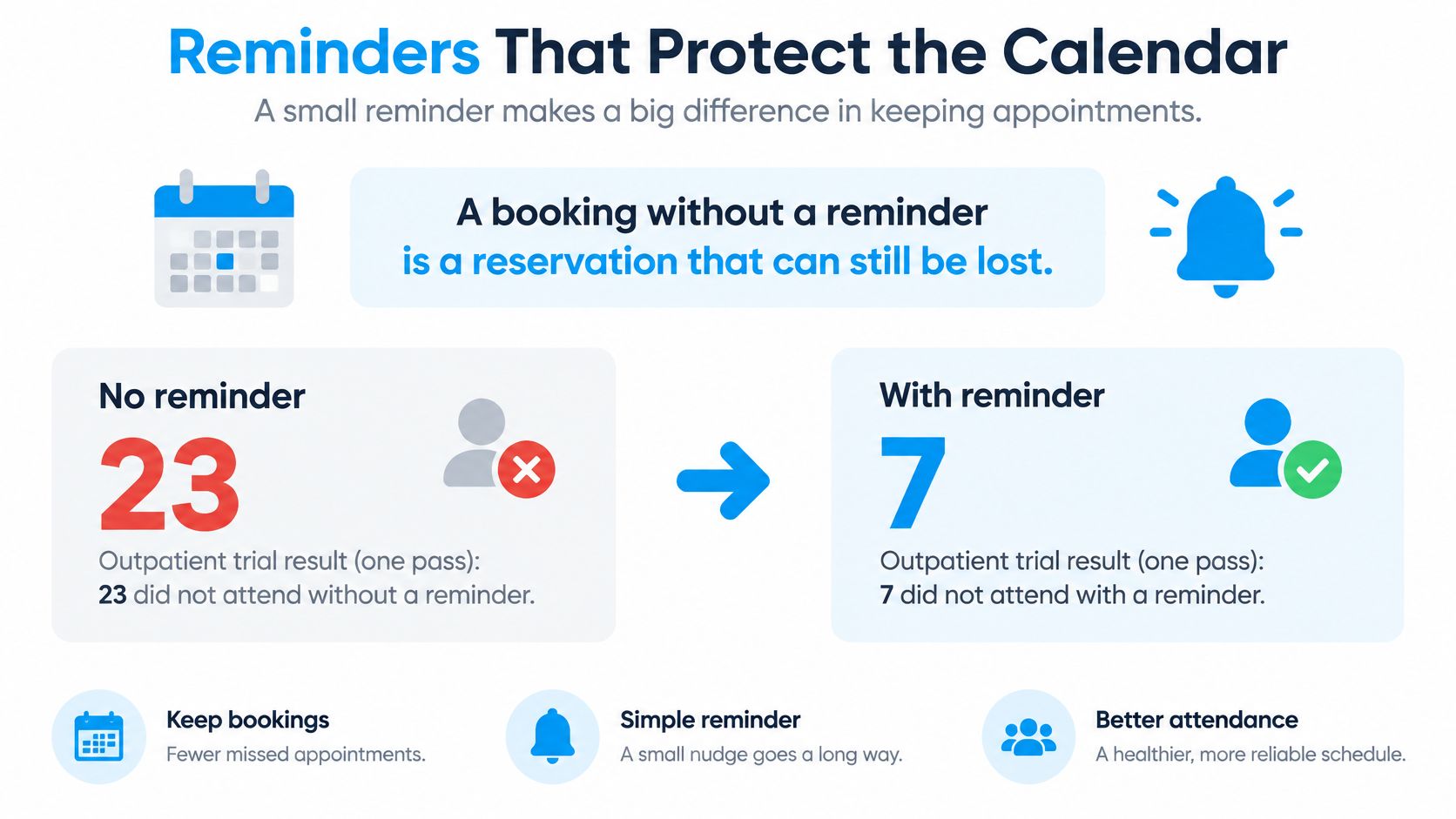
Separate confirmation from attendance follow-up
A confirmation tells someone the booking succeeded. A reminder close to the visit asks whether that plan still works.
For dental and medical clinics, salons, and repair shops, build a route from the reminder to confirmation, cancellation, or rescheduling. Don't make customers call a busy reception line just to release a slot.
Voice plus text gives customers another way to respond when they miss a channel. Test the combination rather than assuming more messages are always better. Truespeak's guide to set up automatic appointment reminders offers workflow context, while our automated appointment reminder calls guide addresses phone-based follow-up.
These findings come from specific care and supervision settings, not a promise for salons or garages. More bookings can make a working day worse if attendance falls and staff can't refill the gaps.
Measures That Show Real Value
Calls answered isn't the success metric. A setter can speak to everyone while booking unsuitable jobs, creating calendar corrections, or leaving customers unable to reach staff.
Compare an AI-handled cohort with a baseline from your own business. Keep service type, operating hours, and customer mix as comparable as practical. Otherwise, you may credit automation for an easier list or blame it for a harder one.
Build a scorecard around completed work
Track answer rate, qualified-conversation rate, booking rate, attendance rate, and revenue per answered call separately. Define each denominator before reporting results. A booking rate based on all dial attempts answers a different question from one based on qualified conversations.
Include completed appointments, cancellations, no-shows, reschedules, recovered cancellation slots, human transfers, and staff time no longer spent on routine scheduling. Audit post-call corrections and complaints as well.
Pass or fail checks for an AI appointment setter
| Check | Pass | Fail |
|---|---|---|
| Live calendar | Writes a real free slot and invites the guest | Promises a time that was never saved |
| Confirmation | Texts the slot before the call ends | Caller leaves with no record |
| Qualification | Asks service, urgency, address, vehicle, or listing before booking | Books every caller |
| Human transfer | Hands off emergencies and requests for a person | Traps the caller in the script |
| Attendance | Reminds, offers a reschedule, and tracks no-shows | Counts bookings only |
| Outbound consent | Names the AI, calls only people who agreed, and stores opt-outs | Dials a cold or suppressed list |
| Audit trail | Transcript, outcome, and who to call next | No way to correct a bad booking |
Check access and acceptance
A 2025 appointment-booking study found online versus offline no-show rates of 1.8% versus 5.9% in a medical practice, but 14.3% versus 11.2% in a hospital. These aren't AI-phone results. They illustrate why the booking channel alone doesn't determine attendance.
A 2025 qualitative study of AI appointment management found that patients valued convenience and reminders but raised concerns about privacy, limited interactivity, fragmented integration, and operational difficulties.
Translate those concerns into review questions. Are customers complaining about recording? Can they reach a person? Are reminders reaching the intended recipient? Are people with changing schedules being contacted repeatedly without an easy rescheduling route?
Owner's review: Read unsuccessful calls as carefully as successful ones. A missing booking is visible; a confused customer may simply stop responding.
Segment attendance risk using relevant appointment history, not assumptions about personal characteristics. Compare voice and text outcomes, and inspect unnecessary outreach. Expand only when completed appointments improve without making access or trust worse.
How Different Businesses Use the Calls
A salon's booking problem isn't an insurer's renewal problem. The useful common ground is a defined next action and a record of whether it happened.
These examples show where qualification belongs before the calendar opens.
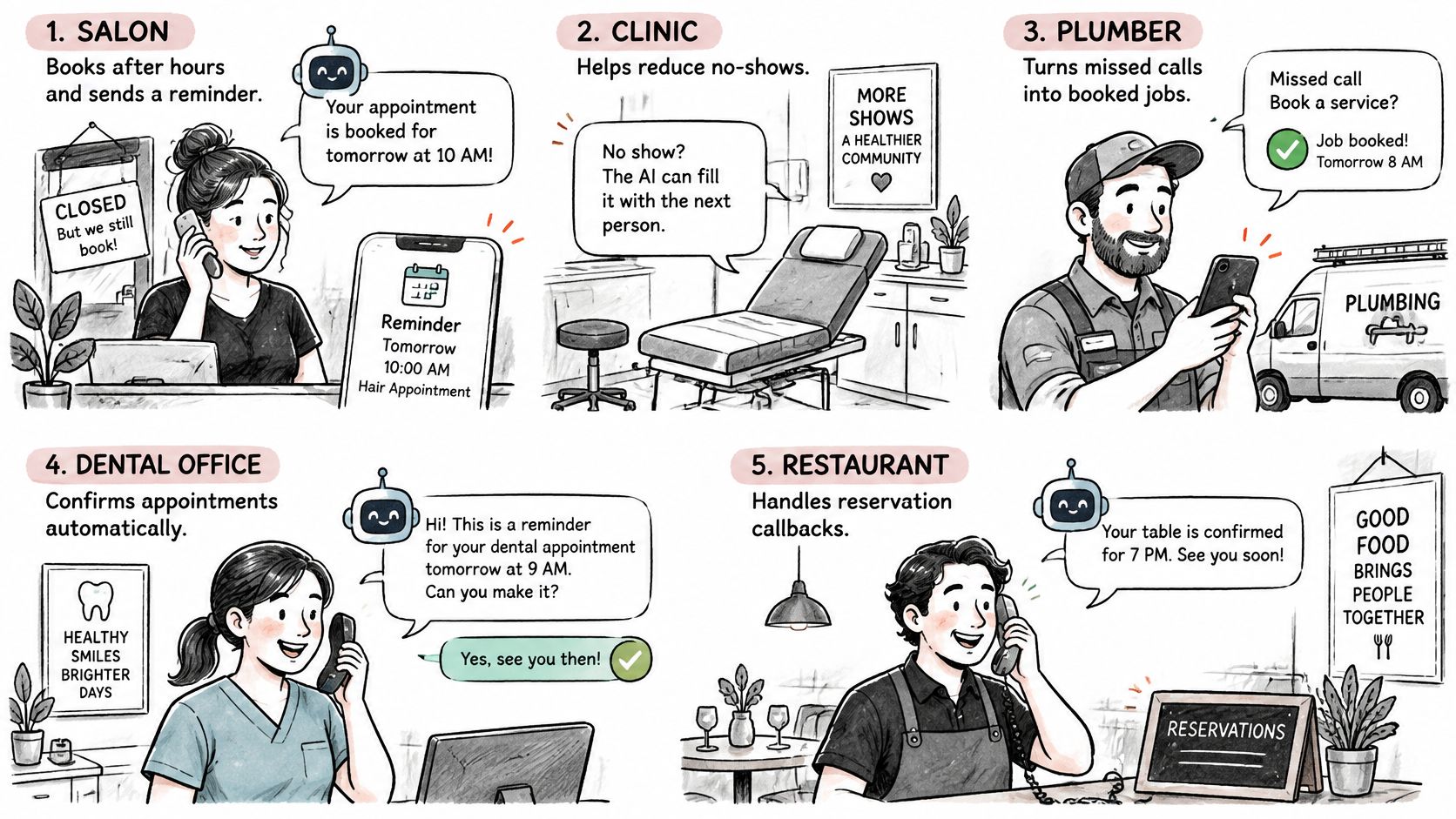
Match the questions to the work
- Salon or clinic. An after-hours caller requests a service. The setter chooses the correct appointment type and records any scheduling requirements, then sends follow-up that lets the customer change plans.
- Trade or auto shop. A technician is under a car or on a job. The setter captures the address, urgency, or vehicle details and separates emergency handling from scheduled work.
- Restaurant. A caller needs a reservation. The setter collects party size, date, and time, checks capacity, and sends the agreed details.
- Real estate team. A prospective buyer asks for a showing. The setter checks the specific property, timeline, and required prequalification before using an agent's availability.
- Hotel or e-commerce desk. The setter answers routine questions from approved website information. Unusual requests, disputed charges, and policy exceptions go to staff.
A law office can use the same discipline for consultation intake while leaving substantive legal questions to a qualified person.
Run permission-based lists as campaigns
Insurance renewals, subscription reminders, research interviews, and customer-feedback calls need different outcomes. So do iGaming and sportsbook campaigns contacting eligible, consenting lapsed players. A refusal must remain a refusal, not a trigger for more persuasion.
For these lists, define disclosure, local-time scheduling, suppression, spending limits, and script-testing rules before launch. Review results by language, campaign purpose, business hours, and inbound versus outbound direction.
The demonstration below gives a phone-workflow reference to compare against your own test cases.
Model revenue without calling it a forecast
A hypothetical scenario in PCN Answers' missed-call analysis uses 400 monthly scheduling calls, 20% missed, 30% booking conversion, and a $200 visit value, yielding 80 × 0.30 × $200 = $4,800 monthly revenue exposure, or $57,600 annualized.
That's scenario modeling, not measured recovery or an industry benchmark. Replace every input with your own figures, and count completed or paid visits rather than the face value of appointments created.
Subtract cancellations, non-attendance, service delivery costs, and operating costs before treating recovered activity as profit. If the setter creates more bookings but no more completed work, the revenue claim hasn't been earned.
Start With a Setter You Can Audit
Start with a short, permission-based list and inspect the results before widening it. Check calendar writes, confirmations, qualification, transfers, attendance outcomes, consent evidence, and the record left for staff.
For a tutoring operator, a resource such as Tutorbase may be relevant to the wider scheduling workflow. The phone-booking test remains concrete: does the appointment reach the operational calendar with enough information for the person delivering the session?
Test both directions before expanding
Dial Milo fits businesses that want inbound answering 24/7 and outbound campaigns in one service. Milo checks connected Google Calendar availability live, writes appointments with callers as invited guests, texts confirmations, and transfers when a person is needed.
Website-based setup takes about 3 minutes, with a wizard drafting the receptionist for review. Milo speaks 20 languages. Outbound campaigns disclose the AI at the start, handle opt-outs, use each contact's local time, cap spend, and A/B test up to five scripts. Call outcomes show who said yes and who needs follow-up.
Understand the billing commitment
Our pricing is prepaid pay-as-you-go, with no subscription, monthly minimum, contract, or per-seat fee, unlike most AI calling and answering services with monthly plans, minute bundles, overage fees, and often contracts.
Talk time on a US number using the standard engine costs about 12¢ per minute, billed per second. Unanswered outbound calls are free. A US number costs $3/month plus a one-time $3 setup fee, or you can forward an existing number for free. Texts cost 1¢. New accounts receive $1 free credit with no card. Unused balances aren't refunded.
The account holder remains responsible for calls, texts, and bookings made in their name. Create an account, review the generated instructions, and test exception calls before contacting customers.
Visit Dial Milo to set up inbound phone booking and permission-based outbound appointment campaigns. Connect your calendar, test a booking and a human handoff, then review the call record before expanding your list.
Keep reading
AI Answering Service Explained: How Calls Are Handled
Learn what an AI answering service does on every call, how bookings, handovers and outbound campaigns work, and what it costs.
Read
AI Voice Agents Explained: How They Work for Business
AI voice agents answer calls, book appointments and place outbound calls. Learn how they work, where businesses use them and the rules to follow.
Read
What Does It Mean to Screen a Call
What does it mean to screen a call? It means judging who deserves a live conversation, not the same thing as blocking, silencing or answering.
Read