If your system can call an entire customer list before lunch, can your team prove why every person on that list was eligible to receive the call? That's the question businesses should answer before choosing a voice or writing a script.
Automated outbound calls need consent records and reliable stop rules, not just a dialer. Whether you run a clinic, a trades business or a large player-reactivation operation, faster calling only helps when the system knows whom it may contact, what it may say and when a person must take over.
What Automated Outbound Calls Are
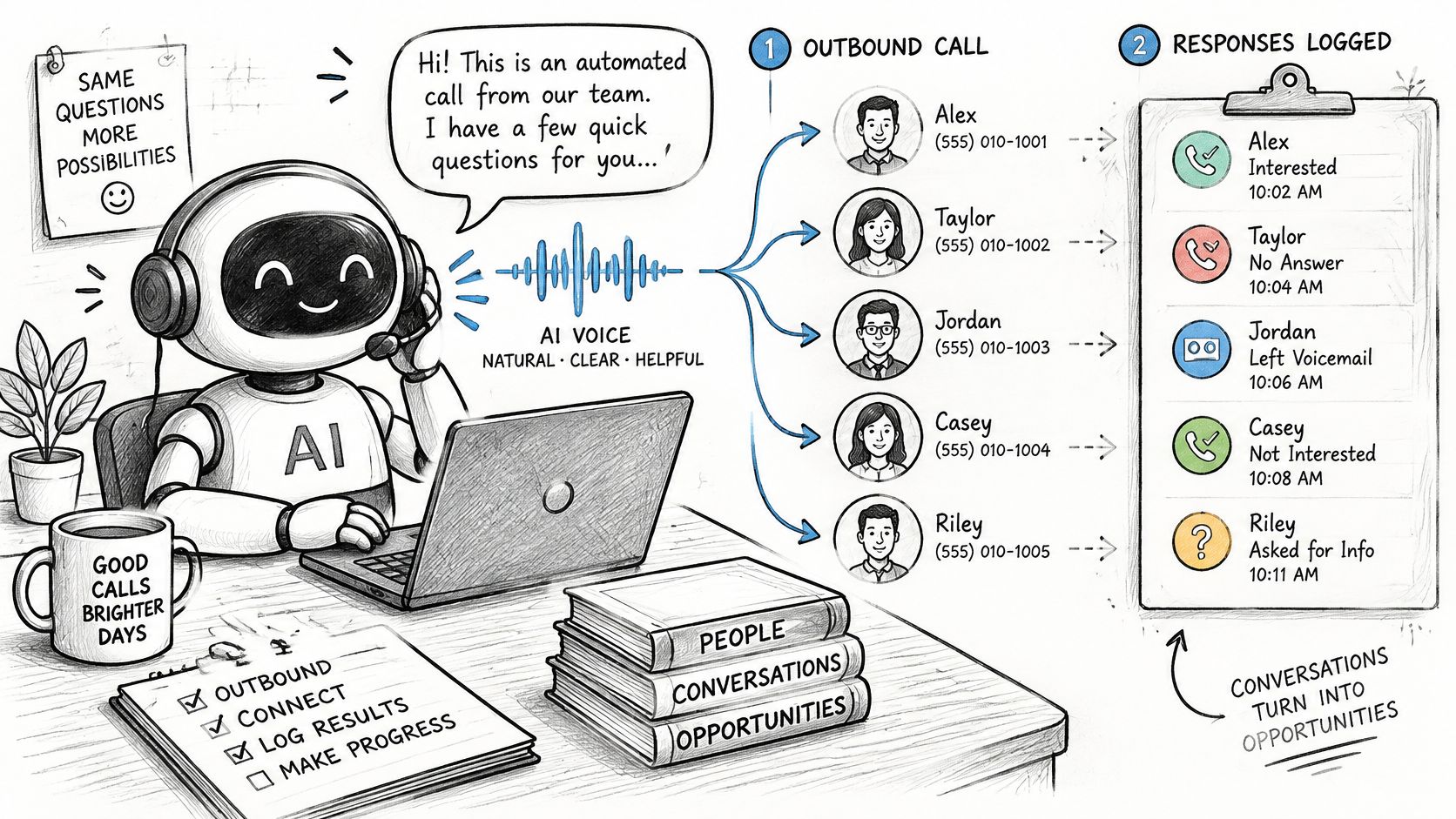
An automated outbound call is a call a system places to a contact list, using an AI or prerecorded voice to deliver a message, with conversational AI also able to answer questions and record how the call ended.
Think of a mail merge. It sends the same letter with different names and details; an AI calling system adds listening and response. A prerecorded message follows a fixed path, while conversational AI can interpret a reply and choose an approved next action.
Say an auto repair shop needs to confirm upcoming appointments. The system calls an eligible customer, identifies the business and the AI, asks whether the appointment still works, then records a confirmation or routes a scheduling problem to staff.
The Parts Behind Every Campaign
A useful campaign has more than a list of telephone numbers:
- Contact list: The people the business intends to reach, with relevant appointment or account details.
- Permission record: Evidence that each person agreed to this kind of contact from this business.
- Voice and script: The approved opening, questions, answers and boundaries.
- Outcome log: A record of what happened and what should happen next.
This illustrates the difference between merely placing calls and managing conversations.
Ordinary live telemarketing involves a person speaking, often after manually dialing. A basic robocall plays a recording and may ignore replies. Conversational AI can respond, but sounding human doesn't make the call legally equivalent to a manually dialed conversation.
The background noise is substantial: U.S. spam robocalls averaged 2.56 billion a month in 2025, according to U.S. PIRG's analysis of YouMail data. Your legitimate reminder arrives in that same environment of suspicion.
When you find a sales calling platform through TopToolAdvisor, evaluate permission controls and outcome records alongside dialing features. Automation changes speed and workload, but it doesn't remove identification or consent duties. Artificial-voice calls can carry stricter requirements than ordinary live calls.
How an Automated Call Runs From Start to Finish
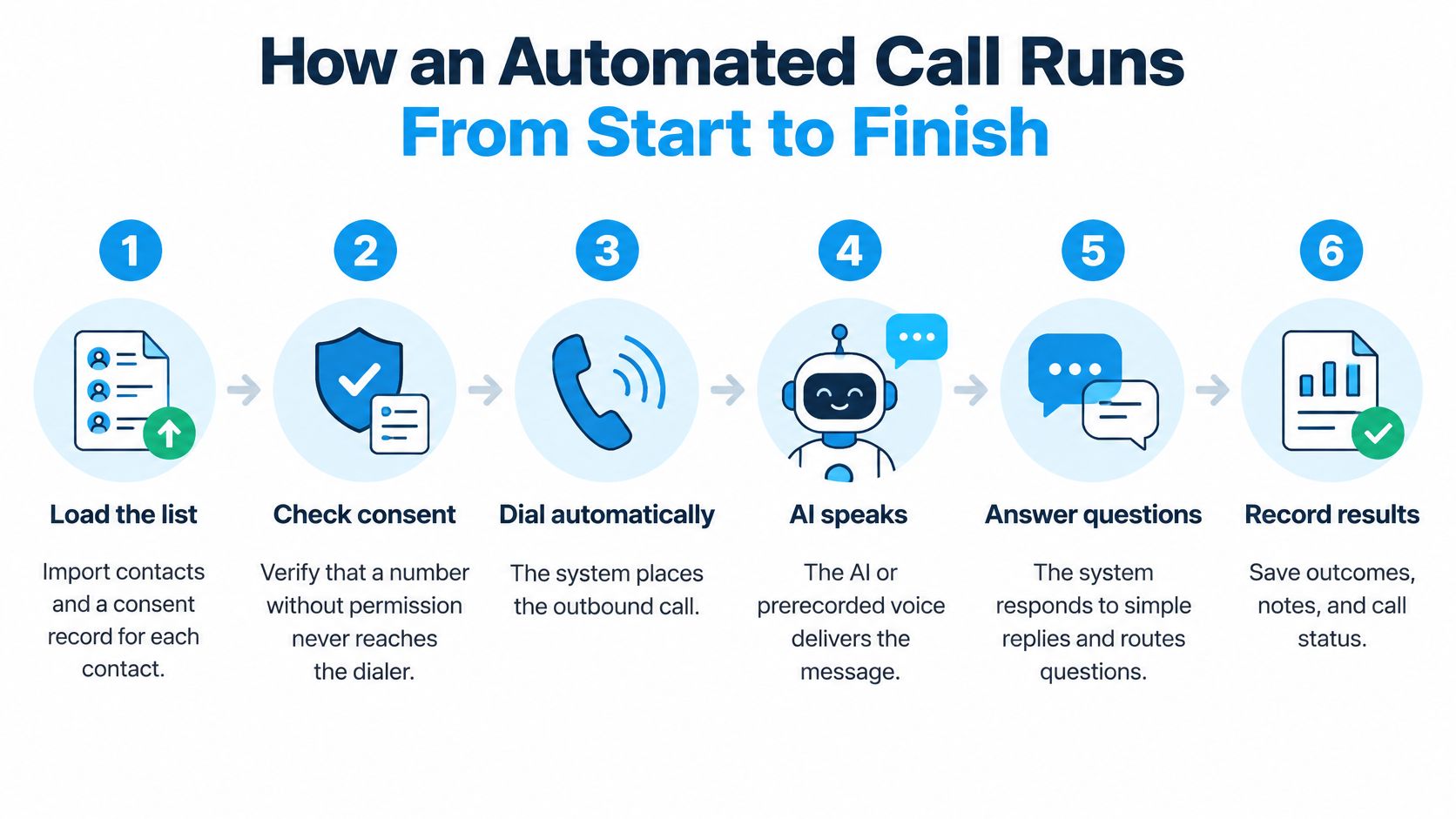
A campaign should move through controlled stages rather than send an uploaded file straight to the telephone network. Each stage needs a clear failure path: when a check fails, the system holds the contact instead of improvising.
The process below shows the basic flow from importing contacts to recording results.
The Checks Before and During a Call
- Load contacts with permission evidence. Import the number, relevant customer details and a reference to the consent record. A missing record should place the contact on hold, not in the dialing queue.
- Check suppression immediately before dialing. Don't rely on the status saved when the campaign was created. Someone may have opted out through another campaign or a staff conversation since then.
- Apply the contact's local calling window. Schedule against the recipient's location, not the office clock. Hold contacts with uncertain time zones until their information is resolved.
- Identify the AI and the business. Start with a direct introduction, such as: “I'm an AI assistant calling for your repair shop about your booked appointment.” Avoid an opening that could make someone mistake the system for a named employee.
- Use approved information. Answer from the business's knowledge base and capture relevant replies. If a requested answer isn't available, acknowledge the gap rather than inventing a policy, price or promise.
- Choose the appropriate branch. A clear stop request ends outreach and updates suppression. A booking can write to the calendar; a confirmation updates the appointment status. A dispute, emotional concern or complex request goes to a person.
- Save the result and next action. Preserve the permitted transcript or call record, the outcome and any follow-up owner. “Completed” isn't useful if nobody knows whether it means confirmed, declined or awaiting a callback.
Make the Handoff Actionable
A transfer should carry context: why the customer was called, what they asked and what the AI couldn't resolve. Otherwise, staff start again and the recipient has to repeat the conversation.
Our workflow supports campaign calls, calendar bookings, text confirmations and transfers, but the business still owns the list and its permissions. Treat the software as the executor of your contact policy, not the source of permission.
This video provides an additional view of the calling workflow.
Before approving a campaign, ask: can you name the consent record and the outcome field for every contact?
Use Cases and the Call Each One Needs
Suppose a salon sends reminders to 300 clients on a Tuesday morning, and a dozen replies need a person to rebook a colour correction. Those are hypothetical figures, but the operational pattern is useful: routine confirmations suit automation, while complex service decisions need staff attention.
The salon shouldn't give both conversations the same script or completion rule. A straightforward confirmation can end with an updated booking; a colour-correction discussion should produce a handoff with notes.
Common Automated Outbound Use Cases
| Use case | Typical goal | Good fit when | Hand off to a person when |
|---|---|---|---|
| Appointment reminders | Confirm, move or cancel a booking | Contact booked a service and expects the reminder | Caller wants a complex reschedule or has a complaint |
| Lead follow-up | Qualify an enquiry the business received | Contact asked for a callback or a quote | Lead needs price negotiation or a specialist |
| Reactivation and win-back | Return lapsed customers or players | Contact gave clear permission for offers | Contact disputes past contact or asks for a person |
| Surveys and feedback | Collect a rating or short answers | Questions are short and specific, with clear consent | Respondent reports a problem |
| Renewals and service reminders | Remind customers before a date | Contract or service date is known | Customer questions the terms or the price |
Choose Predictability Over Persuasion
Good candidates share a predictable purpose, a short set of likely answers and a recipient who expects the business to call. A hotel confirming an arrival detail or a subscription business checking a renewal date can define those boundaries clearly.
An inbound enquiry can also support useful follow-up. A real estate team might confirm the type of property someone asked about and arrange a specialist callback. An insurance team might collect the preferred time for a renewal discussion without asking AI to interpret coverage.
Use the AI call script templates to turn a defined task into an opening, a small set of questions and explicit exit paths. Don't combine a service reminder with an unrelated promotional pitch just because the customer answered.
First contact with a stranger, price negotiation, disputes and decisions about money or health are poor starting points. Even where outreach is lawful, a system shouldn't be expected to persuade its way through uncertainty or make consequential judgments.
Choose the task, not the industry: A clinic's appointment confirmation may suit automation; interpreting a patient's symptoms doesn't.
Start with appointment reminders or straightforward renewals. They're easier to constrain, and staff can judge success against a concrete result rather than a vague impression that the conversation went well.
Consent, Calling Hours and Opt-Outs
Consent and Disclosure Requirements by Call Type
Permission depends on what the call is trying to do. A service reminder and a promotional offer aimed at the same customer can sit under different rules, so classify the call before you classify the list.
| Call type | Consent required | Disclosure required | Notes |
|---|---|---|---|
| US automated call to a mobile number | Generally, prior express consent | AI and caller identity at the start, plus contact information | AI-generated voices fall under the TCPA's artificial-voice rules |
| US telemarketing call with AI or prerecorded voice | Prior express written consent, unless a statutory exception applies | Caller identity, contact details and automated opt-out; disclose AI use | Opt-out must work during the call |
| UK automated marketing call | Specific consent based on an affirmative action | Caller identity and a contact address or freephone number | General marketing permission isn't enough |
| Reactivation of lapsed customers | Documented consent covering new promotional calls | AI and caller identity at the start | An old purchase isn't blanket permission for promotion |
| Service reminder to an existing customer | Consent covering service messages from this business | AI and caller identity at the start | Strongest fit when the contact expects the call |
The FCC's AI-voice ruling confirms that human-like AI-generated voices fall within the TCPA's artificial-voice restrictions: automated calls to mobile numbers generally need prior express consent, while telemarketing commonly needs prior express written consent, unless an exception applies. Caller-identification and applicable automated opt-out requirements also matter.
For UK automated marketing, the ICO's direct-marketing guidance requires specific consent based on an affirmative action, rather than general marketing permission or consent to live calls. Automated marketing calls must identify the caller and provide a contact address or freephone number.
The table is an operating baseline, not a substitute for reviewing the laws applicable to your campaign. AI disclosure at the start is a sensible campaign standard and a requirement on Dial Milo; don't assume every disclosure has an identical legal basis everywhere.
Build a Consent-to-Call Ledger
An uploaded customer list isn't permission by itself. Permission works like a chain of custody: the call is only as defensible as the record that produced it. Attach an auditable record to each number showing where and how consent was obtained, its timestamp, the business named, the disclosed purpose and the permitted channel.
Keep the original evidence, not just a checkbox marked "consented." If a lead came through a shared form, retain the wording the person saw and verify that it covered your business and the intended artificial-voice call.
Reactivation deserves particular care. A past purchase may explain why someone expects a service reminder, but it doesn't automatically authorize a new promotional campaign. Keep service communications and offers in separate campaign categories.
Dial speed multiplies whatever the ledger already says. Clean permission at high volume produces more resolved calls; a missing basis at the same speed produces more unwanted calls per hour.
A contact without a clear permission basis belongs on hold, not in a test batch.
Enforce Time and Stop Rules
Consent answers whether you may call. Calling hours, do-not-call lists and opt-out handling decide when and whether each attempt goes out, and they have to run on every dial rather than only at list upload.
For US telemarketing calls to a home, the FTC's Telemarketing Sales Rule prohibits calls before 8:00 a.m. or after 9:00 p.m. in the recipient's local time, unless the recipient agreed to different hours, and prerecorded-message opt-outs must remain operational 24/7. Store a time zone for every contact and apply any stricter applicable local restrictions. On Dial Milo, outbound calls go out in each contact's local time, so an accurate stored time zone is what keeps a campaign inside the window.
Before launching, use this checklist:
- Verify eligibility: Check consent, relevant do-not-call restrictions and suppression immediately before each dial.
- Identify the call: State AI use and the business identity at the beginning, with required contact details.
- Disclose recording: Enable recording notices wherever the applicable jurisdiction requires them.
- Keep exits working: Test spoken stop requests and any automated opt-out route, including message-based routes.
- Suppress immediately: Send revocations to the shared suppression record so other campaigns don't redial.
- Use recognizable caller ID: Present a business-linked identity, not a misleading identity.
- Constrain volume: Set a daily call limit and spend cap before approval.
On Dial Milo these checks run as platform safeguards rather than manual steps: AI disclosure, opt-out handling, calling hours, spend and velocity caps, do-not-call lists and automatic pausing apply to every campaign. For an operational review, SnapDial's call center compliance guide can complement a jurisdiction-specific checklist. Our AI phone call laws guide helps frame the questions your team should resolve before the first dial.
Customers may not use the service for unsolicited outbound communications, such as robocalls without consent. Before the AI handles calls, the business must enable the dashboard compliance toggles required in its jurisdiction for AI disclosure, recording disclosure and opt-out handling. The business remains responsible for the required disclosures.
Measuring Results Without Hiding Problems
A campaign dashboard can look healthy while the calls underneath it go wrong. Answer rate climbs, and so do repeat dials to people who already asked to stop, transfers that never connect and calls logged as completed that ended in confusion. Consent records and outcome logs are the operating system underneath the numbers: when they work, the metrics stay honest, and when they fail, the metrics are where the failure shows first.
Campaign Metrics and Warning Signs
| Metric | What it shows | Warning sign |
|---|---|---|
| Abandoned-call rate | Answered calls with no connection available | Above the UK reference ceiling of 3 percent over 24 hours in Ofcom's persistent-misuse policy |
| Opt-out rate | Contacts who ask to stop | Rising quickly after a script or list change |
| Repeat-contact rate | Same number called again in a short period | Any call to a number already suppressed |
| Transfer wait time | Time from a transfer request to a person joining | Waits long enough that callers hang up |
| Complaint rate | Complaints per campaign | Any complaint about an unidentified caller |
| Misclassified outcomes | Calls logged as completed that ended in a problem | Transcript shows a stop request, dispute or transfer request despite a completed outcome |
Answer rate alone can mislead. A campaign may reach plenty of people while generating unwanted repeat calls, missed handoffs and complaints. Track whether the intended task was resolved: the reminder confirmed, the offer accepted or declined, the question answered. A pickup that ends in a dispute counts as work created, not work done.
Keep separate counts for attempts, answers, conversations, transfers, opt-outs, failed connections and abandoned calls. Define each status before launch so staff don't use “answered” and “successful” interchangeably. The opt-out and repeat-contact rows deserve special attention: a call placed to a suppressed number means the record that should have blocked the dial failed, and one incident is enough to investigate.
Let Handling Capacity Set the Pace
The abandoned-call figure concerns calls answered by a person with no connection available, measured across each campaign's live calls rather than every unanswered attempt. The Ofcom figure is a UK reference for persistent misuse, and it sets no operating target to approach. For your own pacing, the binding constraint is simpler: how many exceptions your team can absorb at once.
For AI campaigns, reserve enough capacity to respond when people answer and enough human capacity for likely transfers. Start with lower concurrency and increase it only while telephony connections, response time and handoff availability remain stable.
A reminder campaign that raised its parallel dialing at the start of the business day saw the pattern within the hour. More recipients asked to reschedule than expected, transfer waits lengthened, and customers began hanging up mid-queue. The fix was to reduce dialing until the queue cleared and handoffs returned to normal.
Practical rule: Don't place the next wave of calls faster than your team can handle the exceptions.
Use the campaign report guide to understand recorded outcomes and inspect the underlying call records. Assign someone to review changes after a new script, list segment or scheduling rule goes live.
Each week, compare outcome logs with transcripts where recording and retention are permitted. Look especially for “completed” calls containing unresolved questions, disputes or requests for a person. Correct the classification and the workflow that produced it.
When a Human Should Take Over
The best campaign may stop earlier and make fewer calls. A technically completed conversation isn't a good outcome if the recipient was confused, pressured or left without the help they requested.
Treat uncertainty as a routing signal, not an invitation for the AI to keep talking. A system should acknowledge its limits before it gives an answer that staff will later need to undo.
Triggers That Need More Care
- Distress or confusion: The person sounds upset, doesn't understand the offer or appears unable to make an informed choice.
- Uncertain identity: Someone else answers, account details don't match or the conversation risks exposing private information.
- Requests for exceptions: The person wants a waived fee, altered agreement or decision outside the approved rules.
- Accessibility barriers: Hearing, language or communication needs prevent a clear exchange.
- Missing knowledge: The approved information can't answer the question reliably.
Consider a reactivation call to a lapsed gambling customer who says they want a break. End the promotional conversation, suppress or appropriately flag the record, and don't follow with another offer. A request to stop isn't an objection to overcome.
Give Each Exception a Destination
Use a live transfer when a trained person is available and the recipient wants to continue. Otherwise, take a message or arrange a callback with their agreement. Don't promise an immediate transfer to an unattended line.
Log the reason for the handoff, the intended team and the unresolved question. Repeated requests about unclear terms may indicate that the script or approved information needs revision, rather than that staff need to speak faster.
Keep sensitive details out of unnecessary notes, and provide the receiving person with only the context needed to help. AI can handle predictable reminders and information capture; people should handle ambiguity and decisions with consequences for money, health or identity.
What Automated Calls Cost and How to Budget
Dial Milo uses prepaid, usage-based billing rather than subscription tiers. AI processing and telephone costs are charged separately, each call's charge is visible in the dashboard, and current rates are set on the Dial Milo pricing page.
Dial Milo Pricing Terms
| Item | Price or term |
|---|---|
| Talk time | Usage-based, with AI processing and telephone costs charged separately |
| Outbound calls nobody answers | Free, including voicemails, busy signals and silent disconnects |
| Inbound calls that don't connect | Free |
| Phone number | Monthly rental; a new number or a forwarded existing business line |
| Outbound call rate | Depends on the number the call is made from: the campaign's caller ID, or your account number when the campaign has none |
| Billing model | Prepaid and usage-based, no subscription tiers |
| Prepaid balance | Does not expire |
| Concurrent calls | Unlimited on all accounts |
One account covers inbound receptionist calls and outbound campaigns without separate products or tiers. That matters when budgeting: incoming enquiries and scheduled outreach draw from the same prepaid balance, so leave room for both.
Build the Budget Around Connected Talk Time
Use this calculation:
Campaign budget = expected connected talk time × applicable talk-time rate + number rental + texts.
Estimate conversation length by outcome rather than applying the longest script to the whole list. A confirmation may finish quickly; answering a question and arranging a callback takes longer. Use a small permitted pilot to replace guesses with observed talk time, then scale the budget from what the calls cost.
Unanswered outbound calls create no talk-time charge, but they still occupy dialing capacity. Free attempts also carry a cost the invoice won't show: each dial spends one of the attempts a contact has consented to receive, so retry frequency belongs to your consent rules and opt-out handling, and a number without traceable permission shouldn't be dialed at any price.
When reviewing a quote, separate AI processing, carrier charges, number rental, unanswered-call treatment and prepaid-balance rules. A headline talk-time rate is not enough unless you know what it includes.
Set a spend cap that reflects both campaign traffic and routine reception, alongside the daily limit you configure before launch. Spend and velocity caps limit two things at once: what you pay, and how quickly a list is worked through. Because prepaid balances do not expire, load enough for a controlled initial run, check call quality and usage against the dashboard, and top up from there.
Start One Campaign and Test It Safely
Pull the proposed contact list before writing a line of script. Each number needs a traceable consent record for the intended call, and anything uncertain gets removed or held back. Dialing speed is rarely the constraint; permission is. A list that grows faster than its consent records turns every extra attempt into extra risk for the business and the contact.
A narrow, reviewable campaign makes a better first launch than a broad offer to every historic customer. Choose a task whose result staff can verify without interpreting a long conversation, such as confirming a booking that already exists.
Your First Controlled Launch
- Choose an expected call. Start with appointment reminders or straightforward renewals. Give the campaign a specific outcome, such as confirming an existing booking, and assign a staff owner for exceptions.
- Write a short, bounded script. Identify the AI and the business in the opening sentence, offer a clear action, and explain how to reach a person. Test a refusal, an interruption, a wrong number and a question the knowledge base can't answer.
- Set the controls before approval. Configure local calling windows, attempt limits, a daily limit and a spend cap. Enable the disclosure, recording and opt-out toggles your jurisdiction requires; the launch itself waits for the customer's approval.
- Run a small batch and inspect it. After the first day, read the transcripts you're permitted to review and compare recorded outcomes against the intended task. Trigger a stop request during testing and confirm it suppresses that contact in later campaigns, carrying the opt-out forward past the call where it happened.
- Expand only after review. Keep opt-outs, complaints and abandoned calls low, and investigate any suppression failure before continuing. Change one major script or routing element at a time so staff can identify what caused a problem.
Exercise the Failure Paths
A clear, natural greeting is the easy part. A campaign earns trust at its edges, so have a tester request a person when nobody is available, ask to stop midway through a sentence, and give an ambiguous answer to the booking question. Each case should end in a recorded outcome, a transfer, or a follow-up the contact asked for.
Consent records and opt-out handling work like the campaign's operating system: every other feature runs on top of them, and a failure at that layer corrupts everything above it. Set the spend cap from the pricing terms you reviewed while budgeting, and treat it as a ceiling the campaign can approach without ever crossing.
Approval comes last in the sequence. Open the finished list, pick contacts at random, and trace each one back to the permission that authorizes the call and forward to the outcome it will record. If a contact fails either direction of that check, the list goes back for cleaning before a single number is dialed.
Dial Milo answers inbound calls and runs outbound AI campaigns for reminders, follow-ups, feedback and customer win-backs, with disclosure, opt-out handling and human transfers. Visit Dial Milo to prepare a small, permission-based campaign, set its limits and review the results before expanding.
Keep reading

What Does It Mean to Screen a Call
What does it mean to screen a call? It means judging who deserves a live conversation, not the same thing as blocking, silencing or answering.
Read
AI Appointment Setter for Inbound and Outbound
See what an AI appointment setter does on inbound and outbound calls, how booking works, and what to check before you trust it.
Read
Warm Transfer vs Cold Transfer: When to Use Each
Warm transfer vs cold transfer explained: how each works, the speed and context trade-offs, and when to use each for calls, handoffs and outbound campaigns.
Read